 reckoner
Your program, on the wrist you already train with.
Reckoner is a strength coach on your wrist. Your plan arrives on the watch, Reckoner guides you set by set, and every set goes back to reckoner.fit, where your next week is written from what you actually did.
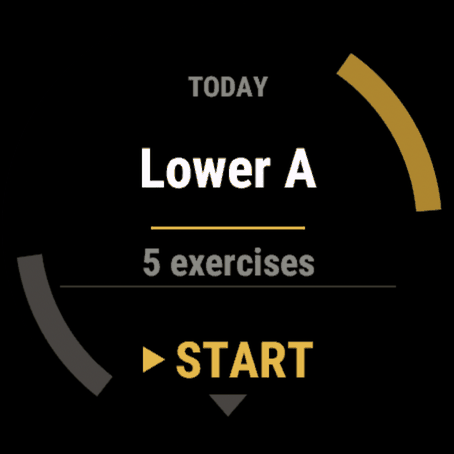
Open the app in the gym and today is already there: the lifts, the sets, the reps and the weights. Your phone can stay in your bag. Lose the link and your last plan is still on the watch, so you train anyway and it syncs when you reconnect.

Free with your account.
It runs on 90+ Garmin watches.
It arrives knowing what you are doing today
Your week is written on reckoner.fit and pushed to your watch. Nothing to type in on the wrist. Each lift opens with your own setup note and a form tip when one is due, then your warm-up, then your working sets, and on a barbell lift it tells you what goes on each side of the bar.
Two questions after each lift, and they start blank
Good reps left? and How was the form? open with nothing chosen, so next week is built on what really happened. Not sure? START skips it, and Reckoner holds the weight rather than guess.
Rough day, or short on time
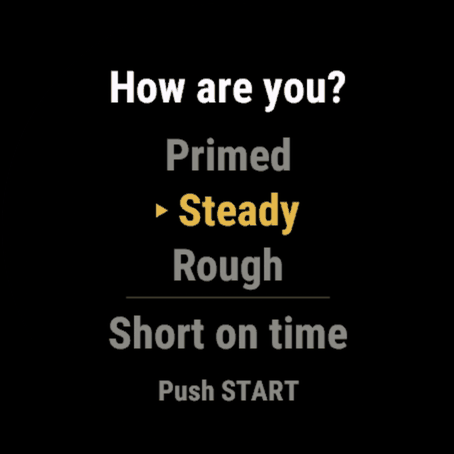
A session opens by asking how you are. Answer Rough and today's weights come down. Short on time trims the day to 30 or 20 minutes and keeps your main lift at the same weight, or gives you Bodyweight 20 instead, and whatever you leave out waits for your next session.
Rest is timed, and it tells you what is next
Rest counts from the moment you finish a set. When the next set is a new weight, the rest screen names it. Ten seconds out it buzzes and reads Get ready. LAP ends a set the way it ends a lap in every other Garmin activity.
A personal best feels like one
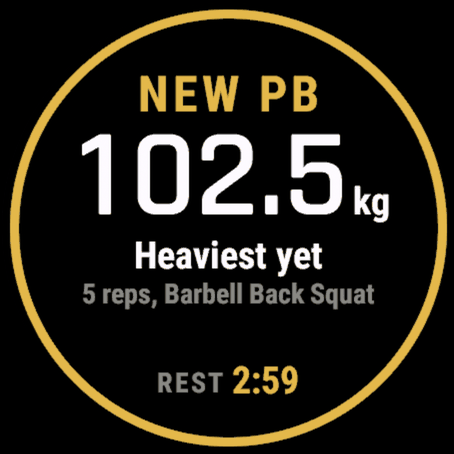
When your form confirms a new best, an amber ring draws around the screen and your wrist plays a buzz it saves for nothing else. It names which best it was, like Heaviest yet, and once the session syncs your done screen shows every best and milestone you earned.
It bends around a real gym
Pause in the middle of a session, and after ten minutes away it suggests one light set before your next heavy one. Swap a lift when the machine is busy, from up to nine matches on the equipment your gym has. Tell it a lift hurts and it lowers the weight or sets the lift aside for today. Fix a set you logged wrong, right on your wrist.
Cardio, in its place
A warm-up before your lifts, a finisher after them, or a rest day on the bike, rower, stairs or treadmill: your watch times it inside the session and pauses it like a lift. Drop sets run on the lifts you turned them on for.
Every set is a real lap, with the load on it
The whole visit lands in Garmin Connect as one strength training activity, each set a lap carrying its reps and its weight, and the engine grades that same record.
Does Reckoner work on my Garmin?
Reckoner is built for 20 Garmin families, and every screen is drawn for the watch it is on rather than scaled to fit, from a 240 pixel panel to a 466 pixel one.
| Family | Models | Screen |
|---|---|---|
| Approach | S50 · S70 42mm · S70 47mm · S72 43mm · S72 47mm | AMOLED |
| D2 | Air · Air X10 · Delta · Delta PX · Delta S · Mach 1 · Mach 2 · Mach 2 Pro | Both |
| Descent | G2 · Mk1 · Mk2 · Mk2 S · Mk3 43mm · Mk3i 51mm | Both |
| Enduro 3 | Enduro 3 | MIP |
| Enduro 4 | Enduro 4 | MIP |
| epix | (Gen 2) · Pro (Gen 2) 42mm · Pro (Gen 2) 47mm · Pro (Gen 2) 51mm | AMOLED |
| fēnix 5 | 5 Plus · 5S Plus · 5X · 5X Plus | MIP |
| fēnix 6 | 6 Pro · 6S Pro · 6X Pro | MIP |
| fēnix 7 | 7 · 7 Pro · 7 Pro, Solar Edition (no Wi-Fi) · 7S · 7S Pro · 7X · 7X Pro · 7X Pro, Solar Edition (no Wi-Fi) | MIP |
| fēnix 8 | 43mm · 47mm · Pro 47mm · Solar 47mm · Solar 51mm | Both |
| fēnix 9 | 43mm · 47mm · Pro 43mm · Pro 47mm · Pro 51mm · Pro Solar 47mm · Pro Solar 51mm | Both |
| fēnix E | fēnix E | AMOLED |
| Forerunner | 165 · 165 Music · 170 · 170 Music · 245 Music · 255 · 255 Music · 265 · 265s · 570 42mm · 570 47mm · 645 Music · 70 · 745 · 945 · 945 LTE · 955 · 965 · 970 | Both |
| Instinct 3 | AMOLED 45mm · AMOLED 50mm | AMOLED |
| MARQ | (Gen 2) Athlete · (Gen 2) Aviator · Adventurer · Athlete · Aviator · Captain · Commander · Driver · Expedition · Golfer | Both |
| Venu | Venu · Mercedes-Benz Collection | AMOLED |
| Venu 2 | 2 · 2 Plus · 2S | AMOLED |
| Venu 4 | 41mm · 45mm | AMOLED |
| vívoactive 4 | vívoactive 4 | MIP |
| vívoactive 6 | vívoactive 6 | AMOLED |
Not sure which you have? Open Connect IQ, go to Devices, and search the store for Reckoner. If it offers you the install, your watch is supported.
What changed
Newest first. Each version keeps its own address, so a link to one still opens it years later.
v2.0.2
Two fixes from your first days with 2.0, both for busy days.
Your week is one press away again. On a day with two sessions on the Today card, such as a finished workout and a cardio series from Anytime, UP and DOWN only swapped between the two. Now DOWN on the last one opens your week, like any other day. The card is clearer too: a cardio series goes by the name you saved it under, and a finished session carries the same green check your week shows.
A cardio series from Anytime stays in Anytime. Starting one on your watch used to move it onto your plan. Now it stays there until you finish it, then shows on that day as done, so your week reads the way you trained.
v2.0.1
v2.0.1 finishes what 2.0 started, with better daily check-ins, smarter session handling and more of your plan available directly on your watch.
Your daily check-in now carries over properly. If you already told reckoner.fit how you feel, your watch shows that answer before you start. Keep it with one press or change it if your day has changed. A second workout on the same day asks again, because how you feel after one session may be different.
Anytime sessions are now on your watch. Press DOWN from Today to open your week, choose Anytime, then start a saved lifting session or cardio series directly from your wrist.
Plans that run in sequence now show Day 1, Day 2 and so on, together with your current round and the next session up.
When Reckoner gives a difficult lift longer rest, your watch now tells you why, including the extra rest added for that week.
Edited sets now show what changed. If you correct 7 reps to 9, your log shows “9 reps, was 7.”
Skipped exercises behave more cleanly too. Restoring a completed lift no longer creates an extra empty set, and cardio can now be skipped even after its timer has started. Cardio stopped within the first minute is automatically treated as skipped.
Short sessions now match reckoner.fit. Your main lift keeps its full sets, every remaining muscle gets covered, then any time left is used for extra work. Pairing preferences are respected when available.
And if you train at multiple gyms, the Today card now shows which location the session was built for, right under the workout name.
Small update, but a lot of the watch experience should now feel more connected and predictable.
v2.0.0
Reckoner 2.0 is our biggest Garmin watch update yet. We've spent weeks training, testing and improving how Reckoner coaches you through every workout. From your first warm-up to your final set, your watch is now smarter, more flexible and more personal.
Smarter progression
After each lift, tell Reckoner how many good reps you had left and how your form felt. Not sure? Skip the questions. Reckoner holds your weight rather than guessing.
Celebrate your personal bests
New personal bests get their own celebration, with an amber ring, a unique vibration and recognition of what you achieved. Review your milestones after your workout.
Pause, resume and correct
Interruptions happen. Pause your session anytime, pick up where you left off and correct incorrectly logged sets directly on your watch.
Short on time? No problem.
Choose a 20 or 30-minute workout, or a 20-minute bodyweight session. Reckoner adjusts your plan without penalizing you for exercises you couldn't finish.
Your workout, your way
See your personal setup notes, perform drop sets, swap exercises based on available equipment and adjust when something hurts. Your watch adapts to you, not the other way around.
Cardio is here!
Warm up, finish your workout or dedicate a session to cardio. Choose from the treadmill, bike, rower or stairs. Everything stays together in one Garmin Connect activity.
Better rest, better lifting
Rest timers start when your set ends and show the weight you'll need next. Smarter load adjustments account for your equipment and how you're feeling.
More watches, better experience
We've improved screen layouts and readability across our supported devices. Reckoner now works on more than 90 Garmin watches, including the vívoactive 6, Enduro 4, Approach S70/S72 and D2 Air.
Thank you for training with Reckoner!
Every workout syncs to reckoner.fit, where your next training week is built around what you actually accomplished.
36 earlier versions
v1.9.1
If you tell your watch you feel Steady before a session, that answer now syncs back to reckoner.fit just like Rough and Primed. Previously, Steady was left out, which could leave an earlier answer showing on the site instead of how you actually felt when you trained.
Rest screens are more useful now too. Between warm-up sets, before your first working set and before your next lift, your watch shows the weight you are about to lift, giving you time to get the bar ready.
Between working sets it stays out of the way unless the weight changes. If you see a weight there, it is time to change your plates.
v1.9.0
Warm-up sets now get their own rest timer.
After every warm-up set except the last, your watch counts down the rest time you chose on reckoner.fit, or one minute by default. This gives you time to change the weight and start the next set ready.
The rest screen shows which warm-up is coming next. Press LAP to skip the timer whenever you are ready, or let it finish and the next warm-up set opens automatically.
Warm-up screens now clearly say “Warm up”, and the button hints are a little brighter so they are easier to read in the gym.
v1.8.1
Planks, holds and carries now use the form check too.
A timed hold with a sagging or shifting position is not really the same exercise, so Reckoner now looks at your form before asking you to hold it longer.
After a timed hold, your watch asks “How was the form?” just like it does after your other lifts.
Be honest with yourself when you answer. If your position broke down, score it that way. Reckoner can only make the right progression decision if you give it an honest assessment.
Report Rough form, or Fair form on a hold that took everything you had, and Reckoner keeps the same time next week instead of adding more.
Clean holds continue progressing as before.
v1.8.0
We dug into the research and found that how hard a set feels is only half the story. How well you move matters too.
After each lift, your watch now asks “How was the form?” with Clean, Fair or Rough. Clean is already selected, so a good lift takes just one press.
The effort question now reads “Good reps left?” because only good reps should count toward progression.
You grade your own form, and your results depend on an honest answer. Your weight only goes up after clean reps.
The form tip before a lift now appears the first three times you do an exercise, then comes back after a Fair or Rough set.
v1.7.0
Assisted pull-ups now recognize progress correctly. Using less assistance now counts towards your personal records.
Metric dumbbell weights now match a standard rack. But if your rack is different you can set up your individual rack under "Setup > Your Gym > Dumbbells".
Set screens now show the exact rep target instead of only just the range.
Improved readability across hints, plate calculations and several other watch screens.
v1.6.6
Improved workout sync reliability.
Your watch can now hold up to 24 workouts waiting to sync, up from 8. You’ll also get a warning before the oldest workout would need to be removed.
Workouts that need to be retried are now kept safely on the watch, and workouts are never sent to a different account if the watch is paired to someone else.
v1.6.5
Reckoner now supports the Garmin fenix 9 series.
Four newly added lifts now have a short name on the watch: Close-grip lat pull-down, One-arm landmine row, Reverse cable crossover and Stiff-leg deadlift read as CG Lat Pulldown, 1-Arm LM Row, Rev Crossover and Stiff-leg DL.
v1.6.4
Reckoner now works on seven more Garmin watches: Venu, Venu Mercedes Benz Collection, Venu 2, Venu 2 Plus, Venu 2S, Venu 4 41mm, and Venu 4 45mm.
If you use one of these watches, you can now install Reckoner directly from Connect IQ.
v1.6.3
If you train in pounds, the watch now knows that a US dumbbell rack starts at 2.5 lb and steps 2.5 lb up to 10, and that kettlebells start at 5 lb. It used to open at 5 lb on the dumbbells and 10 lb on the bells and step 5 lb from there, so a 2.5 or a 7.5 lb dumbbell was a weight it could not offer you at all and the lightest lifts had nowhere to start.
v1.6.2
Finished a workout but your watch couldn’t send it? Reckoner now tries again the next time you open the app, even if today is a rest day.
That means a completed session no longer sits stranded on your wrist while your training plan moves on without it. Your workout gets back to reckoner.fit, and your next sessions are built from what you actually did.
Rest days are clearer too. The card now shows **Pick a day**, and pressing Start opens your week so you can jump back into a session you missed without guessing which button to press.
v1.6.1
A big one for training flexibility. Save and resume workouts. Leave mid session and pick up where you stopped later that day. Train any day in your week. Press Down from Today, including on a rest day, to choose another session. Left and right sides are tracked separately. Unilateral lifts now get their own timer and entry for each side. Smarter weight jumps. Dumbbell and kettlebell progression now follows the weights you are actually likely to find in the gym. We also cleaned up Start over, session timing and a handful of watch screen details.
v1.6.0
The kettlebell ladder no longer skips a bell. In kilograms it went from 40 straight to 48, which is a bell most racks do not hold and a jump past the 44 sitting next to it, and in pounds it went from 50 to 60 and skipped 55, 65 and 75. Kettlebells go up by 4 kg above 12 now, and by 5 lb up to 80, so easing or stepping a load lands on a bell that is actually in the rack.
Every lift you do one side at a time now gets its own timer and its own entry for each side, with the screen saying LEFT or RIGHT above the set count, and three sets still means three sets rather than six.
Choosing Start over now tells reckoner.fit you threw that work away, so the Today card states the time you actually spent training rather than counting the session you abandoned as a gym trip of its own. Nothing is deleted, and a day you saved and came back to still counts both trips.
If you train in kilograms, the watch now knows that a dumbbell rack steps 2.5 kg above 20 rather than 2. It used to offer 22, 24, 26 and 28 kg, which are not bells most gyms hold, so easing or stepping a load could land you on a weight you could not pick up. The rungs above 20 kg are 22.5, 25, 27.5 and 30 now, and nothing below 20 kg has moved.
Choosing Start over on a day you had already begun now actually starts it again: the screen moves straight to how you are feeling today and the session opens at set 1, instead of leaving you looking at the same menu wondering whether the press landed. The row underneath it reads Clears today's sets, which is true whatever time you train.
A session you have to walk away from is no longer over. If the app closes on you part way through a day, for an update, a flat battery or anything else, your logged sets are kept and the day stays open until midnight, so the next time you open Reckoner it offers to resume from the set you were on rather than starting you again at the first lift. The session menu now offers Save and finish or Save for later, and a day you finished early can be reopened from the Today screen while it is still today.
Press Down on the Today screen and you now get your whole week as a list, so you can train Thursday's session on a Tuesday when the rack you need is free. A tick marks a day you have finished and a half filled dot one you put down half way, the day you pick is the day that gets reckoned, and the day you did not train is left exactly as it was. Picking a day that is not today shows you what is in it before it starts, and Pick another day is on the Today menu as well.
The two curved marks at the edge of the Today screen sit at two and eight o'clock now, which clears the bottom of the face and stops them running into the line at the foot of the screen when your weekday holds more than one session.
A small triangle now sits at the foot of the Today screen and blinks three times when you arrive, so the week waiting under a press of Down is something you can see rather than something you had to find.
A long day name no longer draws over the scroll mark on your week list, and on the confirm screen the line under a two line day title and the divider above a wrapped confirm sentence no longer cut through your own text.
v1.5.0
On the assisted pull-up, tapping rough now gives you more help from the machine instead of less, so a bad day is actually easier the way it is supposed to be, and tapping primed gives you less help for a harder set. The confirm screen now lights up in amber whichever part of the number Up and Down are about to change. On the reps and time screens that is the whole value, and on the weight screen it moves from the whole number to the decimal the same way Start already does, so a glance tells you which digits a press will move before you press anything. This update reaches your MARQ watch too. Recent work in this release grew past a limit a handful of older Garmin models enforce, which would have left them out of today's update, and that is fixed now.
v1.4.1
v1.4.1 On an easier day your warm-up ramp no longer shows the same weight twice. Easing every rung by the same amount could land two of them on one weight your gym can actually make, so a ramp of 20, 25, 30 and 35 became 20, 20, 25 and 30 and asked you to do the first set again. The repeat is gone, the rungs that are left are the weights they always were, and the rest before your first working set still comes where it always did.
v1.4.0
A day you have started but not finished now offers START rather than REPEAT, and the watch no longer marks it done. Half a session is not a session, and pressing REPEAT on one started it again from the first lift. Reckoner.fit and your watch were on opposite sides of this and now they agree: a day counts as trained when you have lifted on it, and it counts as finished when every lift on it has an answer, whether that is a set or a skip. The label on the confirm screen now says which unit you are working in, LOAD KG or LOAD LB, and the weight under it is digits alone. The unit belongs with the label, because it never changes while the digits do, and the number gets the whole row to itself. The arrows either side of the weight are gone. Up and Down are buttons on your watch and they still change the number by exactly what they always did; the effort screen has never drawn arrows and nobody has been confused by it. The weight now sits where that screen puts its own, with more clear space above and below it than the arrows ever left. The rest screen and the session timer are one screen. The word REST or TIMER now sits beside the number rather than above it, on the same line as the digits, which is where the working weight already puts its kg. A word above a number can be crowded by it on some watches, and on one of them it was being drawn into the digits. Beside it, it cannot be. Everything else on that screen stays: the heart rate and its gauge, the line saying what is next, the amber last ten seconds, Get ready, the time of day. During a rest the screen counts your rest down; every other moment it shows how long the session has been running and names the lift you are on.
v1.3.0
A weight in pounds that ends in a quarter no longer runs off the edge of the confirm screen. On some watches 203.25 lb was wider than the panel could light, so it lost a character at each end and you were shown a shorter number than the one you had lifted. The weight is drawn a size smaller on those watches when it needs to be, and never cut. Kilograms are unaffected, and so is every weight that already fit.
Your watch now tells Reckoner which Garmin it is and which version of the app is on it, so the site can name your watch and tell you when an update is actually waiting for you rather than telling everyone the same thing. It rides the syncs the app already makes, there is nothing to turn on, and the privacy policy says what is kept.
There is a rest between the last warm-up set and your first working set now, so you no longer walk from a light bar straight into a heavy one. The plan already asked for it and the watch was throwing the number away. The screen is the one every other rest uses, the line under the clock reads Set 1 next, and the session opens the moment the rest ends. Warm-ups still count toward nothing, and a lift you ramped straight into is untouched.
The load screen now shows what a press is worth by where the arrows are, and the label above the weight is the word LOAD again. It used to read LOAD 0.5, which is easy to read as a weight of half a kilo rather than as the size of a step. The arrows now sit over the part of the number they change: over the whole number when Start opens the field, and over the decimal after one more press of Start. Nothing about the buttons has changed, and a pound weight still moves a quarter at a time.
The rest countdown is now the same size as the session timer, and the word REST above it has room again. The countdown was drawn a size larger than the clock on the data page, for the same kind of number, and on a 240 pixel watch it left the word almost touching the digits. Both screens now draw one clock, at one size, on one row, and only the label above them differs.
The rest timer now runs for the whole rest. A one minute rest used to end a fraction under the minute, so your watch marked the lap at fifty nine seconds and read it back to you that way. It ends on the minute now, and the buzz that warns you ten seconds out lands on the ten.
Tapping Steady at the start of a session is now recorded like the other two answers. The watch used to send nothing at all for it, on the reasoning that Steady changes no weight, so the most ordinary answer you can give was the one thing your history never showed. It changes no weight still. It is simply written down now, and the session you log will say what you felt.
A full rest now records as the number on the clock. It used to log one second short every time, because the countdown and the stopwatch measuring it were reading two different moments.
A good day's lift no longer offers a dumbbell heavier than the heaviest pair you told Reckoner your gym holds. Turning on the boost for a primed day used to be able to round a working weight up past your own rack, a number no dumbbell in the building could give you, and the watch drew it anyway until the next pull put it back. It cannot draw that number now.
v1.2.0
10 August 2026
You can now log the weight you actually lifted. The up and down buttons on the confirm screen used to jump between the loads your gym is supposed to stock, so a machine that pins in tens could not be told you did 315, and the set went down as 310. They step by one pound or one kilo now, whatever the movement is, and pressing Start again drops to a quarter pound or half a kilo for the micro plate you slid on. Hold either button to travel a long way quickly. The screen still opens on the weight Reckoner asked for, so if that is what you did, nothing changes.
The set screen now shows a clock. It sits beside the set count at the bottom and counts the set you are on, in amber while the set is running and grey before it starts, so you can see at a glance that the watch is following you rather than waiting.
Cable work now steps in the smaller jumps a cable actually makes. A push-down, a face pull and a cable curl run through a pulley that halves the weight on the pin, so the up and down buttons used to move them twice as far as the machine can, and the weight Reckoner asked for was one the athlete could not set. Twelve movements move in half steps now. The lat pull-down, the seated row and the machines with a seat are unchanged, because those pull straight off the stack.
v1.1.1
6 August 2026
On the smaller watches the word REST no longer runs into your heart rate. The bigger heart that came with the last release left the rest screen with the heart and the number sitting on top of the word underneath them, so all three read as one smudge on a 240 pixel screen. The word now drops clear of them, and it only moves on the watches that needed it.
v1.1.0
5 August 2026
Two lifts trained back to back now run on your wrist as rounds. Reckoner used to walk you through a superset as if it were two separate lifts, so it asked you to rest in the one place a superset says not to. It now takes you through one set of each movement in turn, gives you the short gap between them, then the full rest before you go round again, and it counts the rounds on the set screen. Three or four movements in a circuit work exactly the same way.
The short gap between two paired lifts names the one you are walking to, so you know which movement to set up for without reading a countdown to work out which kind of break you are on.
The heart beside your heart rate is bigger, drawn the same height as the number, so the two read as one thing.
Each movement in a superset or a circuit is still scored on its own at the end, so nothing about the way your next week is worked out changes.
A superset shows up as one line on the plan page, naming both lifts and how many rounds, rather than as two lines saying the same thing.
The screen that asks how a lift went now asks in reps. It reads Could do more, and under the number it tells you what the number means, from No more up to 4+ more. The word RPE is gone, and so is the line telling you what we were hoping for, which was never any of your business at the moment you answer.
v1.0.7
2 August 2026
The heart rate Reckoner keeps with a session now describes the whole session. The average was whatever your heart was doing in the one second you finished, read on the screen after your last set while you were already coming back down, so it always read low. The peak only reached back as far as your last rest, so the hardest set of the day was thrown away unless it happened to be the last one. Both numbers now cover every reading from your first set to your last.
Telling Reckoner that something hurts now leaves you on a weight you can actually load. Backing a lift off used to take exactly a fifth off whatever was on the bar, so a 21kg dumbbell became 16.8kg and no rack in the world has one, and stepping up or down from there kept you between the weights for the rest of the session. It now backs you off to the nearest weight your gym can make, and a second back-off from there lands on a real one too.
If you lift in kilograms, every weight Reckoner puts in front of you is now one your gym actually holds. Up and down used to move by a fixed amount, so a dumbbell could climb through 11kg and a machine could ask for half a pin, and neither exists. Reckoner now steps by the rack and the pin your gym is stocked with, it will not take a barbell below the empty bar, and if you have told it about your own bar, plates or machines on reckoner.fit, your wrist follows those instead. It works offline like everything else.
v1.0.6
2 August 2026
Reckoner now runs on the fenix 5 and fenix 6, and on twenty-four more watches in all. The fenix 6 Pro, 6X Pro and 6S Pro, the fenix 5X, 5 Plus, 5S Plus and 5X Plus, the Descent Mk1, Mk2 and Mk2 S, the D2 Delta, Delta PX and Delta S, the Forerunner 945, 945 LTE, 745, 645 Music and 245 Music, and on the newer side the Forerunner 165, 165 Music, 170, 170 Music, 70 and 265s. If you kept an older fenix or Forerunner as your lifting watch, Reckoner runs on it now.
Reckoner now runs on the MARQ, and on fourteen more watches in all. Both MARQ Gen 2 models and all eight of the original MARQ collection, the Forerunner 570 42mm, the Descent Mk3 43mm, the Descent G2 and the Instinct 3 AMOLED 45mm. Nothing on any screen has changed. The MARQ collection needed one thing fixed before it could run at all, and it was ours rather than the watch's.
On five of those watches Reckoner reads in your watch's own lettering rather than its own, joining the three from the last release. All eight MARQ collection models, the Descent G2 and the Instinct 3 AMOLED 45mm cannot load the typeface the rest of the app is set in. Every load, rest and count is the number it always was, and nothing is cut short.
v1.0.5
2 August 2026
Reckoner now runs on thirteen more watches. The Forerunner 970, 570, 265 and 255, the Enduro 3, the Instinct 3 AMOLED 50mm, the Descent Mk3i 51mm, the D2 Mach 1 and both Mach 2 models, and the fenix 7 Pro and 7X Pro Solar Editions without Wi-Fi, which are the same watches as the ones Reckoner already ran on and were missing by oversight rather than by choice. Nothing on any screen has changed. If you were already wearing one of these you could not find Reckoner in the store at all, and now you can.
On three of those watches Reckoner reads in your watch's own lettering rather than its own. The Forerunner 255, the 255 Music and the Instinct 3 AMOLED 50mm cannot load the typeface the rest of the app is set in, so they use Garmin's. Every load, rest and count is the number it always was, and nothing is cut short or hidden: the words are simply drawn in a slightly different face.
v1.0.4
2 August 2026
A day with nothing on it no longer looks like a fault. On a rest day the watch used to say No plan, with reckoner.fit unreachable and an error code under it, so on the one day it had nothing to fetch it told you it could not reach anything. It now reads Nothing today, and under that, Rest, not missed. The line about reckoner.fit is still there when reckoner.fit really is out of reach, which is the only time you should ever see it.
A carry now shows you what to pick up. A movement you hold for time with weight in your hands used to give you a clock and no load, so you got to the rack knowing how long and not how heavy. The weight sits under the name for the whole set, and when you end it you can correct it the same way you correct any other lift, in case you had to take the pair next to the one it asked for.
Farmer's, front-rack and overhead carries can now be prescribed to you.
The card that tells you what is coming up next no longer says reps about something you hold for time. A wall sit reads 0:45 where it used to read 45 reps, and the line under it that reminds you what you did last time reads the same way. Both lines are shorter, so on the smaller watches they stop running off the edge and losing the how-hard-was-it number at the end.
v1.0.3
1 August 2026
Start now opens the session menu from every screen in a session. If you had paged across to your plan, your heart rate or the cue, the press used to do nothing at all, on the screens where your set is out of sight, so the watch looked like it had stopped listening. The page puts itself away and the menu comes up, exactly as it does from a set and from a rest.
Holding up to tell Reckoner how a lift went now works while you are confirming your reps and weight and while you are grading the set, so you can report a twinge on the screen right after the set that caused it instead of having to finish confirming first.
Nothing you see or feel on the watch has changed in this one. Every load, rest and count is the number it was. What changed is underneath: the app is now checked much more strictly when it is built, so a whole class of mistake gets caught on the bench instead of on your wrist.
v1.0.2
1 August 2026
Today's plan now tells you what you left on a lift you skipped, so a lift you put down after two of its three sets reads as two of three instead of wearing the same tick as a lift you finished, and one you skipped before you started reads as a dash. The list of skipped lifts says the same thing under each name, so you can see what is still owed before you pick one back up.
Reckoner no longer has a Settings button in Garmin Connect. There was one field behind it, a token box you were told to leave blank, and nothing else. You set Reckoner up at reckoner.fit and pair the watch from the watch, so there is nothing to fill in on your phone.
v1.0.1
1 August 2026
The session menu you get from start is rebuilt: skipping a lift and picking a skipped one back up now live there, alongside Save, Discard and a new Exit that throws the session away and closes Reckoner to your watch face. Holding up is for telling Reckoner how a lift went, and that is all it holds now.
The little heart beside your pulse is redrawn and now looks like a heart on every watch Reckoner runs on, instead of a rounded blob with a spike on the smaller screens.
A movement you hold for time now waits on zero until you press lap, so the clock starts when you actually get into the plank rather than while you are walking to the mat, and the seconds you confirm are seconds you spent holding. The screen tells you which press is next: lap starts it, lap ends it.
While you are holding, the watch now buzzes twice so you never have to find the screen from the floor. Two light taps at ten seconds to go, with Keep holding on the screen, then one long buzz the moment you hit your target and the screen turns green. The clock carries on counting if you have more in you, because the target is what you were asked for and not a limit.
The heart rate arc during a session now colours off your own zones even when the watch will not hand them over, working them out from the date of birth Reckoner already has, so a steady effort no longer shows up a band low and the heart beside your pulse stops sitting on grey while you are working.
The heart beside your pulse now always matches the band it sits under on the arc, where before the two could briefly disagree about which zone you were in.
If you train in pounds the watch now says so, showing every load in pounds like the rest of Reckoner, moving the weight 5 lb a press instead of a step no rack stocks, and drawing on the plates an American bar actually carries whenever it breaks a load down for you.
If you train in pounds, every weight Reckoner asks you for is now one your gym can actually make. A barbell climbs 135, 140, 145 rather than a number that leaves a pound over on each end, a dumbbell prescription is a pair that is on the rack, and a machine moves by a pin position you can put the peg in. The plate breakdown draws for far more of your sets as a result, and UP and DOWN step you to the next real weight instead of a fixed amount. Nothing about a session in kilos changes.
v1.0.0
1 August 2026
Starting a session now asks how you are first, and one tap eases today's loads on a rough day or lifts them a little on a primed one, with the watch showing you exactly what it did to the weight before you warm up.
On the last rung of a warm-up the watch now tells you the next press starts your first set, and pressing start on any rung opens the session menu the way it does everywhere else instead of quietly dropping the rest of the ramp.
Your first working set now opens on the Reckoner mark building itself a plate at a time, with a short buzz, so a session starts on a moment rather than sliding into it, and any press skips it.
A movement you hold for time, like a plank, now shows a target and a timer counting up while you hold instead of reps and a weight, and the watch records it in seconds so a 45 second plank no longer lands in Garmin Connect as 45 reps you never did.
Beating a personal best now shows on the rest straight after the set that did it, once, so you are told the moment it happens.
The screen at the end of a session now leads with how long you trained, big enough to read at a glance, with how the day went out underneath it and DONE at the bottom.
The screen that scores an exercise is down to the question, your number and the target, so the only thing on it is the answer you are giving.
When the day ends with exercises still skipped, the count is now the thing you see first, and start opens the list so you can pick one back up.
On the Today card the button that starts your session used to slip off the bottom edge whenever the card was also telling you the plan was offline or already logged, and it now sits on the screen in every state.
Pairing no longer shows any amber, because amber is saved for the moment you start a session and pairing is never that moment.
When the watch is connecting to pair, cannot reach reckoner.fit, or your pairing code has run out, those screens no longer draw their lines on top of each other on the larger watches, so the message stays readable.
Long exercise names now use a shorter name written for a watch screen, so a lift that read as "Overhead Dumbbell Trice..." now reads "DB OH Triceps" and fits. You get it on the set screen, the cue card, the rest screen, the plan list, the next-up page and the warm-up. The menus still show the full name, because that is where you are choosing between lifts rather than recognising the one in front of you.
Your rest screen is down to the countdown, your heart rate, one line naming what is coming and the time. The lift's name, its weight and its reps have a page of their own now, and the coaching cue has its own screen, so nothing is squeezed in under the timer.
During a rest you can now press down for your heart rate and the zone gauge, for the cue of the lift you are walking to, and for the whole day's plan, the same pages you already had during a set. The page naming your next lift only appears on the last rest of an exercise, which is the one rest where what comes next is actually new.
The page for your next lift now tells you what you did to it last time, the weight, the reps and how hard it felt, so you know what you are walking into before you get there.
When you confirm the weight you just lifted, a barbell movement now shows you what to put on each end of the bar, and it changes as you press up and down.
A weight that lands on a quarter of a kilogram is now written out in full instead of being rounded, on every screen that shows you one, so what you read is what goes on the bar and what gets logged.
The zone you are working in is now shown by that band of the gauge getting thicker, instead of by a line drawn across it. The line cut the colour in two and read as a bigger break in the ring than the gaps between the zones do, and those gaps are what you are meant to be reading.
The heart beside your rate is a redrawn mark rather than one built out of two circles and a triangle, and it still takes the colour of the zone you are in.
The data page shows one timer now, how long you have been on this exercise, in the middle of the screen where the two used to share it. The time of day has moved to a quiet line at the bottom.
Every word on the watch is now set in one typeface on every model instead of a different one per watch, and the lines telling you what start and lap do have been shortened so they are no longer cut off at both ends on the smaller screens.
The heart beside your rate, the up and down arrows, the check marks and the page dots are drawn with smooth edges now instead of stepped ones, and on the larger watches so is the heart rate zone gauge.
Your heart rate has moved down the data page so a three digit rate no longer runs into the zone gauge above it, and the kg beside a weight and the AM beside the time now sit level with the bottom of the digits instead of drifting away from them on the bigger watches.
Your working set is four screens now instead of one crowded one. The screen you lift from carries the reps, the weight, the movement and which set you are on, in the largest type the watch draws. Press down and you get your heart rate with the zone gauge, how long the session has run, how long this set has run and the time. Press down again for the coaching cue, again for the whole day's plan, and once more to come back. Every exercise that has a cue now opens on it, on a screen of its own, so the sentence that tells you how to do the movement gets read before you start rather than squeezed under everything else. Wherever you have paged to, the lap button still moves the workout on, and a page you leave open puts itself away after a few seconds.
The heart rate gauge reads as five separate bands now rather than one arc that changes colour, with a slot of black between each one, so you can tell at a glance which zone you are in without reading the number.
The four screens you spend a session looking at have been redrawn. Your working set now carries a heart rate zone arc across the top with your live rate beside it in the zone's own colour, your load in the largest number the watch draws, and the time of day and how long you have been training along the bottom. The rest screen keeps that arc and countdown and names either the set you are between or the lift you are heading for next, with the weight and reps waiting for you there.
A coaching cue on a rest now takes the bottom of the screen. The time of day and your elapsed total step aside while there is something to tell you and come back the moment there is not.
Adjusting your reps and your load is one screen doing two jobs. The number you are changing is large and white in the middle, the one you are not is small and quiet underneath, and a triangle above and below shows which way up and down move it, which frees the bottom line to tell you the thing you cannot see: that start confirms.
Your RPE is now coloured by how the effort sits against the goal rather than by how big the number is. Eight is the target and shows green, six and seven show blue, nine shows amber and ten shows red. Blue is not a mark against you. It says there was more in the tank, which is exactly what the engine needs to know to write you a heavier week.
The heart rate has come off the screens where you cannot act on it. It stays on your working set and your rest, where the number tells you something you cannot feel accurately, and it is gone from the two adjust screens and the RPE screen, which each have one job. To put your live rate in the right band the watch now reads your heart rate zones from your Garmin profile, so it will ask for that permission once after this update.
Pairing and your Today screen have been redrawn. The pairing screen no longer runs its lines into one another, the code you type in at reckoner.fit sits on its own with room around it, and once the watch is linked it says so for a moment before your plan arrives, so you know it worked. Today's card now leads with the name of your workout at full size and says plainly where it stands: ready to train, working from the last plan it pulled while you are offline, already logged, or unable to reach reckoner.fit.
Your main lifts now start with a warm-up ramp. Before the first working set of a heavy lift, the watch walks you up to your working weight with a few lighter sets, and you tap the lap button through each one before you start lifting for real. The ramp is built off the weight you are about to lift, so it scales as your loads climb, and lighter or accessory movements skip it. Press start at any point to jump straight to your first working set.
You can see the whole day from inside a session. Press down on a working set or a rest and the watch shows where you are in the day, press down again for the lift that is coming and the weight it wants, and once more to go back to where you were. Nothing on those two pages can be changed, so a glance mid-set cannot cost you a rep, and a page left open takes you back on its own after a few seconds. If you look while you are resting, the countdown pins to the top and keeps running.
The escape hatch opens during a rest now. Hold up on a rest and you get the same list you get on a working set, so the moment you notice a cranky shoulder is a moment you can report it, and the rest carries on counting behind it. Resting also adds one item of its own, "Add a remark", for the note that is not a complaint. The list reads in plain words now, fastest need first: something hurts, too heavy today, swap this lift, skip this lift.
The last ten seconds of a rest turn amber. The countdown changes colour where it stands and the line under it says "Get ready", so the warning is legible from across a gym, and it lands at the same instant your wrist taps.
Every buzz on the watch now has its own rhythm. A light tap says something registered, two even taps mean ten seconds left, three quickening pulses mean go, and one long buzz means the work is done. They are told apart by shape and length rather than by strength, which is what survives a tight strap, a sleeve, and a heavy set.
v0.4.8
29 July 2026
Your set times in Garmin Connect are right again. Each set now shows its own time on the lap. Before, every set after the first counted the rest you took before it, so a quick set could read as minutes. Your rest is its own lap now, so the numbers match what you actually did, whether it is the rest between sets or the recovery before your next lift.
v0.4.7
You get your rest after the last set too. After the last set of a lift, the watch now runs the rest timer before it moves you on to the next exercise, the same countdown and cues you get between sets. This last rest names where you are headed, "Next · Lat Pulldown", so you can rest and move to the next machine. Before, it jumped straight to the next lift with no rest, so the recovery you had earned after your hardest set of the movement was the one the watch skipped. The final lift of the day still finishes straight to your summary, because there is nothing to rest for.
v0.4.6
Today's screen now shows your day's name. The workout card leads with the name you gave the day, "Lower Strength" or whatever you called it, so it reads the same on your watch as it does on reckoner.fit. A renamed day no longer shows an old muscle-group label that had stopped matching the lifts.
v0.4.5
Your workouts now say what you trained. Each session saves to Garmin Connect under the day it was, "Upper A · Reckoner" rather than a plain "Reckoner", so your history reads like the training it was and a session shared to Connect or Strava shows the work, not just the app.
v0.4.4
A tidier settings screen. The app no longer shows a server address field you were never meant to change. Your account and plan are set up on reckoner.fit, and a short note on the settings screen now says so.
v0.4.3
Two more watches are in. Reckoner now runs on the Forerunner 955 and the Forerunner 965, laid out for each screen the way it is on the rest of the lineup.
A long exercise name fits the screen. When a lift's name is too long for a menu row, the watch trims it with an ellipsis instead of letting it run off the edge, so you can always read which lift the row is.
Leaving a session no longer leaves a ghost workout in Garmin Connect. However you leave, backing out, discarding, or the watch closing the app on you, Reckoner ends the recording cleanly. It saves a Garmin activity only when you actually logged work, and when you did, reckoner.fit and Garmin Connect now agree on it.
v0.4.2
The watch records what you actually lifted. The confirm screen at the end of a set now carries a load as well as reps. START steps from reps to load and then commits, LAP steps back, and UP and DOWN move whichever field is in front of you. The load moves by that lift's own increment, 2.5kg on a barbell and 1kg on a fixed dumbbell rack. Whatever you set carries into your next set and onto reckoner.fit. Until now the watch posted the prescribed weight whatever went on the bar, so working up or backing off never reached next week's plan.
The buttons work the way every other Garmin activity does. LAP ends the set and skips a rest. START selects: it confirms your reps, locks your RPE and picks a flag reason, and on the set and rest screens, where there is nothing to select, it opens the session menu (Resume, Finish and sync, Discard). A stray press can no longer drop you out of a session part way through.
The rest screen tells you where you are. It now names the set you just finished and the lift you were doing, `Set 1/3 · Dumbbell Press`. At ten seconds left the REST label itself turns green and reads `Get ready!` in place, so nothing on the screen jumps while you are watching the clock.
A skipped exercise is not lost for the day. Once you have skipped something, the flag menu and the session menu both offer Skipped Exercises. Pick a lift back up and it comes next, on the set you left off at rather than from the top. If the day runs out with something still skipped, the app holds and asks instead of quietly sending.
The flag menu is a proper Garmin menu. Hold UP on a working set and the escape hatch (pain, swap, too hard, skip) slides up the way the menus on the rest of your watch do, and it scrolls, so a long list no longer has to fit on one screen.
v0.4.1
Rest timer cues you by time now. You get a double buzz and a green "Get ready!" with ten seconds left, then one firm buzz when rest is over. The old cue leaned on wrist heart rate, which was too noisy mid-workout to trust. Time is steady, so the heads-up lands when it should.
Flag menu scrolls the right way. Hold UP on a working set to open the flag menu (swap, pain, skip, and the rest). UP now moves the highlight up the list and DOWN moves it down, matching every other screen. Before, they were reversed.
v0.4.0
24 July 2026
Support for the fenix 8 generation. The app now builds and installs across the full device family, the fenix 8 and fenix E included.
A clearer Today screen. A greeting, a weight tile, and a feed that tells you when your next session is due.
Something wrong on the watch?
Write to hello@reckoner.fit and tell us which watch you are wearing, what it did, and what you expected instead. A screenshot of the screen helps more than anything else, because most of what goes wrong on a wrist is something we cannot reproduce on a desk.
One person reads all of it and answers with a reason.